How to insert multiple images in sajha post - Sajha Mobile
SAJHA MOBILE
How to insert multiple images in sajha post
Posts 2 · Viewed 7183 · Go to Last Post

San
· Snapshot
Like · Likedby · 0
There are different ways to insert multiple images into your sajha postings.

The easy way is to copy images from other sites by simple right clicking on an image in another site and pasting it to the sajha posting space. Note however that copying images from your online emails will not work since you need to be logged in as yourself in order to view it so others will not be able to.

The second way to post images into sajha is by uploading to sajha. The simplest way to do it is to use the "Include file" option below the posting space. This only allows for one image upload.
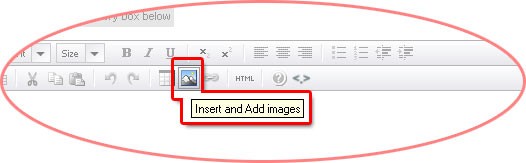
If you want to upload and post multiple images in your posting then this is what you have to do:


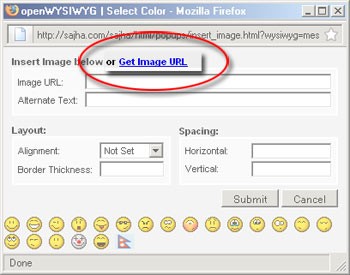
Clicking on the image icon will open a new window as shown below:


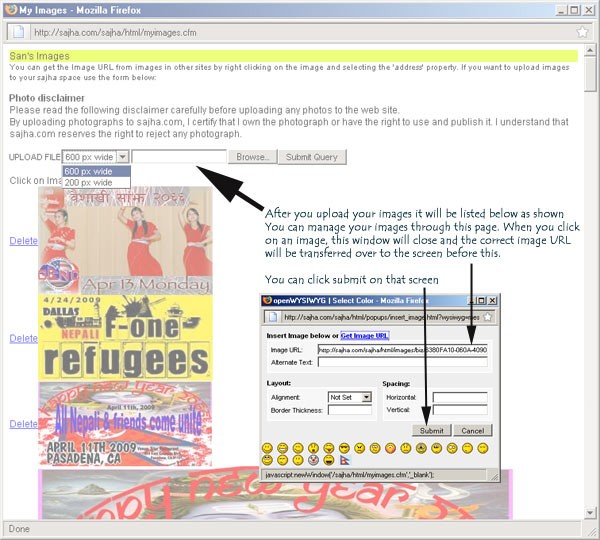
Click on the "Get Image URL", it will open a new window as shown below. This is your images store within sajha where you can store your images for your postings. Your images will be resized to 200, 400, 700 pixels as selected. (picture below shows 600 and 200 options but I've just changed it to 700, 400 and 200).


It's relatively straightforward from here. Let me know if you have any problems with it.

Regards

V2001
· Snapshot
Like · Liked by · 0
nice...
Please log in to reply to this post

You can also log in using your Facebook

View in Desktop
What people are reading
You might like these other discussions...
· Posts 1 · Viewed 145

· Posts 1 · Viewed 136
· Posts 1 · Viewed 143

· Posts 1 · Viewed 241
· Posts 1 · Viewed 319
· Posts 1 · Viewed 245
· Posts 1 · Viewed 258
· Posts 1 · Viewed 406 · Likes 1
· Posts 1 · Viewed 452
· Posts 1 · Viewed 331



Travel Partners
Travel House Nepal